Vibe Coding for Students: Build Your First App Without Writing Code

Humain Learning

What if building an app was as easy as describing what you need?
Say your Biology test is on Monday and you'd rather revise from flashcards than from a photocopied chapter. A few years ago, building your own flashcard app meant learning Python, then a framework, then a database. Most people quit somewhere around week three.
That's not how it works anymore. Vibe coding for students means describing the app you want in ordinary English while an AI assistant writes the code underneath. No programming background, nothing to install, and most tools cost nothing to start with. If you can explain your idea clearly, you can have something running tonight.
What follows is the practical version. What vibe coding actually is, what's sensible to attempt first, the five steps that take you from one sentence to a live link, which tools will genuinely let a 15-year-old sign up, and the point where AI stops being able to help you. That last one rarely makes it into the tutorials.
What Exactly Is Vibe Coding?
Vibe coding is building software by describing it in plain language while an AI model produces the code. Andrej Karpathy coined the term in early 2025, and it spread fast enough that Collins made it Word of the Year for 2025.
The mechanics matter less than what it removes. Learning to code used to mean a long stretch of frustration before anything appeared on screen, and that gap is where most beginners gave up. Vibe coding deletes the gap. You see something working inside ten minutes, which is a completely different motivational position to be in.
What it doesn't remove is the thinking. Someone still has to decide what the app is for, who'll use it, and what should happen when a user taps the wrong button at the wrong moment. The AI writes. It doesn't decide.
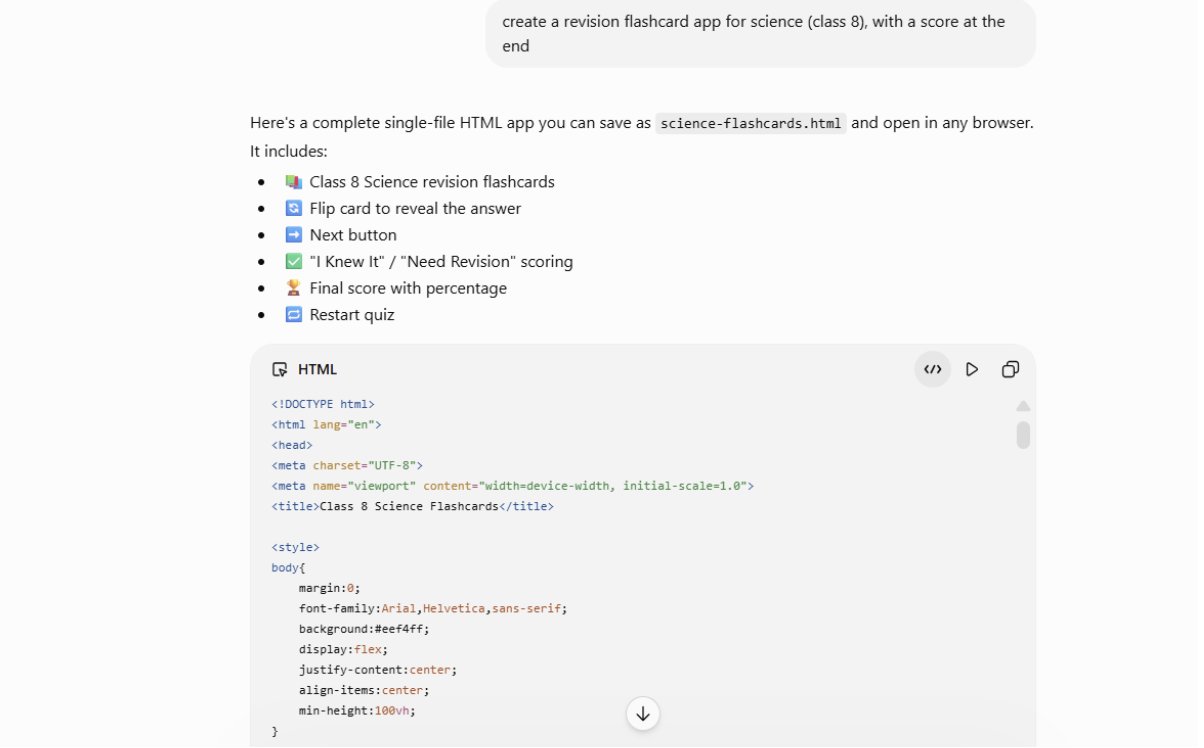
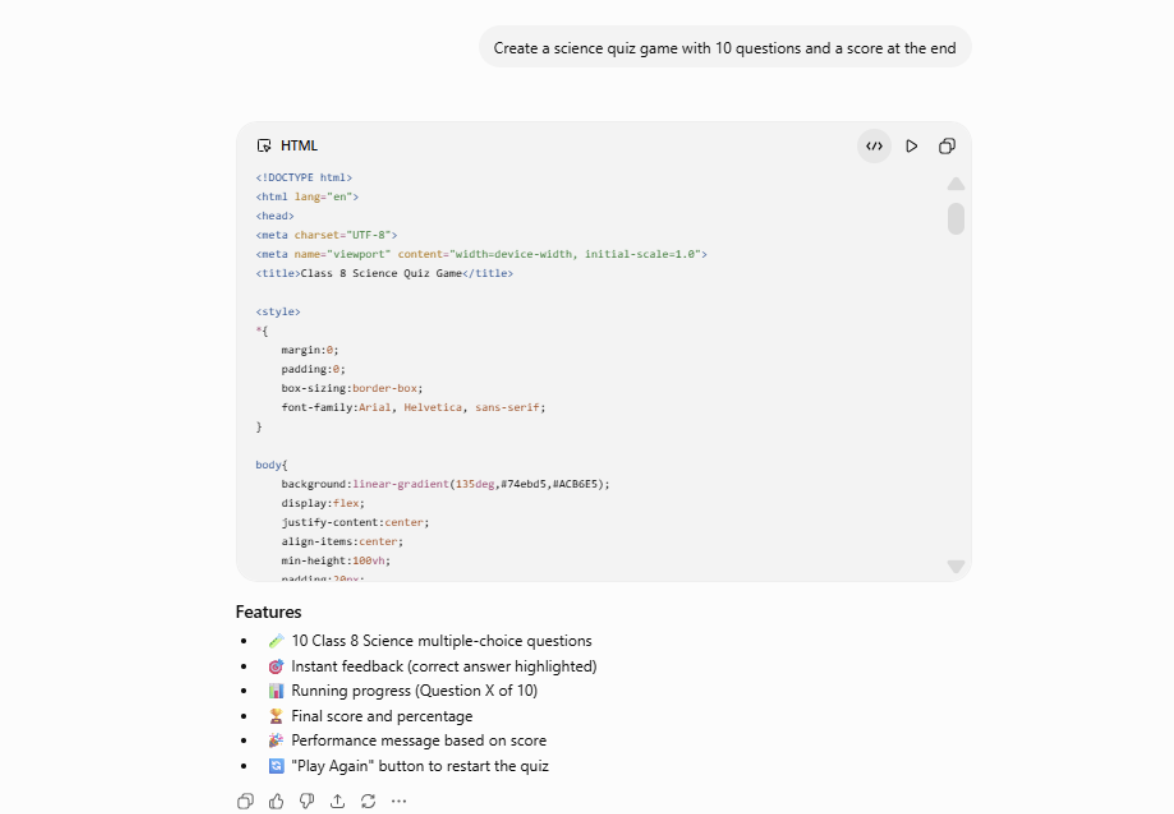
Examples of vibe coding:
What Can You Actually Build Without Writing Code?
You can realistically build small, single-purpose web apps that solve one clear problem. Think trackers, tools, and quizzes rather than the next Instagram. They run in a browser, work on a basic phone, and can be shared as a link.
Projects that work well as a first build:
- A revision flashcard app for one subject, with a score at the end
- A timetable or homework tracker that saves entries on the device
- A quiz on a chapter you are studying, for your classmates to attempt
- A marks-percentage calculator built for your school's grading system
- A reading or attendance log for a club or library
Each does one thing, needs no payments, and stores nobody else's personal data. That last part is what keeps a beginner project safe to share.
How Do You Build Your First App, Step by Step?
Building an app without coding takes five steps, and a first project usually runs thirty minutes to two hours. How specific your first prompt is decides almost everything.
- Write the idea in one sentence: "A flashcard app for Class 10 Biology that shows a question, reveals the answer on tap, and tracks how many I got right." Vague ideas produce vague apps.
- Pick one tool and open it: Do not compare five platforms. Any mainstream builder handles their first project.
- Paste that sentence in as your first prompt: Add the details you care about: colours, screen order, and whether it works offline.
- Test it like a stranger would: Tap everything. Leave a field blank. Enter the wrong thing on purpose. Then tell the AI exactly what broke, in plain words.
- Publish and share the link: Most tools deploy to a live URL in one click.
Step four is where the learning actually happens, and most beginners skip it. Describing a bug precisely is a genuine technical skill. Pick one project from the list above and try it this weekend before reading another guide.
Which AI Tools Can Students Use, and What Are the Age Rules?
Most AI coding tools set a minimum age of 8, and some require parent's permission. This matters more than which tool looks nicest, because signing up below the stated age breaks the platform's terms and removes protections built for younger users.
| Tool | What it is good for | Minimum age under current terms |
|---|---|---|
| ChatGPT | Planning the idea, writing prompts, explaining errors | 8+, parental consent required under 18 |
| Google Gemini | Same, and available on most school Google accounts | 8+ with a Google Account |
| Replit | Building and hosting the app itself | 8+, under 13 with written parental consent |
| Lovable | Generating a full app from one description | 8+, or under 18 with a parent's permission |
Terms change, so check the sign-up page rather than a list. If you are under the stated age, the fix is legitimate and simple: build on a parent's or teacher's account, with them present.
What Are the Limits of Vibe Coding for Students?
Vibe coding gets you to roughly 80% of a working app very quickly, then slows sharply. The last 20% is the odd bug; the feature that keeps breaking needs someone who understands what the code is doing.
Professional developers hit the same wall. In the 2025 Stack Overflow Developer Survey, 84% of developers said they use or plan to use AI tools, yet 46% actively distrust the accuracy of what those tools produce. People who code for a living check the output. So should you.
There is a school rule to respect too. If you submit a vibe-coded app as a project, say so. Most teachers accept AI-assisted work when it is declared and object strongly when it is hidden.
None of this means you can skip learning to code. It means you start at the interesting end, then pick up the fundamentals with a reason to care. Structured AI lessons for Grades 3 to 12 fill in what a chat window never will.
Learning AI Properly, Not Just Prompting It
"Building one app is a good way to spend a weekend; understanding what you built is a career advantage."
HAILM (Humain AI Literacy Mission) runs India's own national AI literacy movement for students and teachers, with a free Foundation course for Grades 3–12 covering roughly 3.5–4 hours of self-paced learning, plus optional live sessions, challenges, and expert webinars. Completion earns a certificate.
The curriculum is designed by educators with decades in child-centred pedagogy, board-aligned to NEP 2020, NCF 2023, and CBSE, and adapted from global frameworks including UNESCO, OECD, and EU AI literacy standards.
It costs nothing, runs on low-bandwidth devices, and comes in English and Hindi, with more Indian languages planned. The belief is simple: AI literacy belongs to every student, not only the ones with expensive devices.
Your first vibe-coded app should not be the end of the story. Build it this weekend, then learn what is happening underneath.
Frequently Asked Questions
Is vibe coding good for beginners?
Yes. AI coding for beginners is arguably the best entry point available, because you see a working result on day one instead of month six. The catch is that you must test everything the AI produces rather than assuming it works.
Can a student build an app without knowing how to code?
Yes, completely. A first web app needs no prior programming knowledge, only a clear description of what you want and the patience to test and refine it. Expect two or three rounds of fixes before it behaves properly.
Which no-code app for students is easiest to start with?
A flashcard or quiz app is the easiest first build. It has one screen, no login, no payments, and no stored personal data, which removes almost everything that normally breaks a beginner project.
Is it allowed to use vibe coding for school projects?
Usually yes, if you declare it. Most schools permit AI-assisted work when students state clearly which parts were AI-generated. Check your school's policy first, and never present AI-generated code as entirely your own work.